An AI product video generator can shorten the path from a product page or image set to a vertical video test. It does not replace creative judgment. The useful question is whether the workflow helps you form a clear hypothesis, preserve product accuracy, and create an original video that can be reviewed before publishing.
This guide uses Oumomo Viral Remake as one current workflow example. Product-specific details come from Oumomo's public pages and the interface supplied with this article, so confirm the live product and pricing pages before making a purchase decision.
Key Takeaways: Start with a testable hook, not a promise of virality. Use product images you own and references you are allowed to study. Review packaging, claims, hands, captions, audio, and platform specifications before posting. Send viewers to one focused product or campaign page so the result can be measured.
What should an AI product video generator actually do?
It should connect five jobs that are often split across separate tools: reference research, product input, prompt direction, video generation, and export review. A generic text-to-video box may create an attractive clip, but a commerce workflow also needs to keep the product recognizable and the message easy to test.
A practical evaluation starts with these questions:
- Can you provide several approved product angles instead of one compressed image?
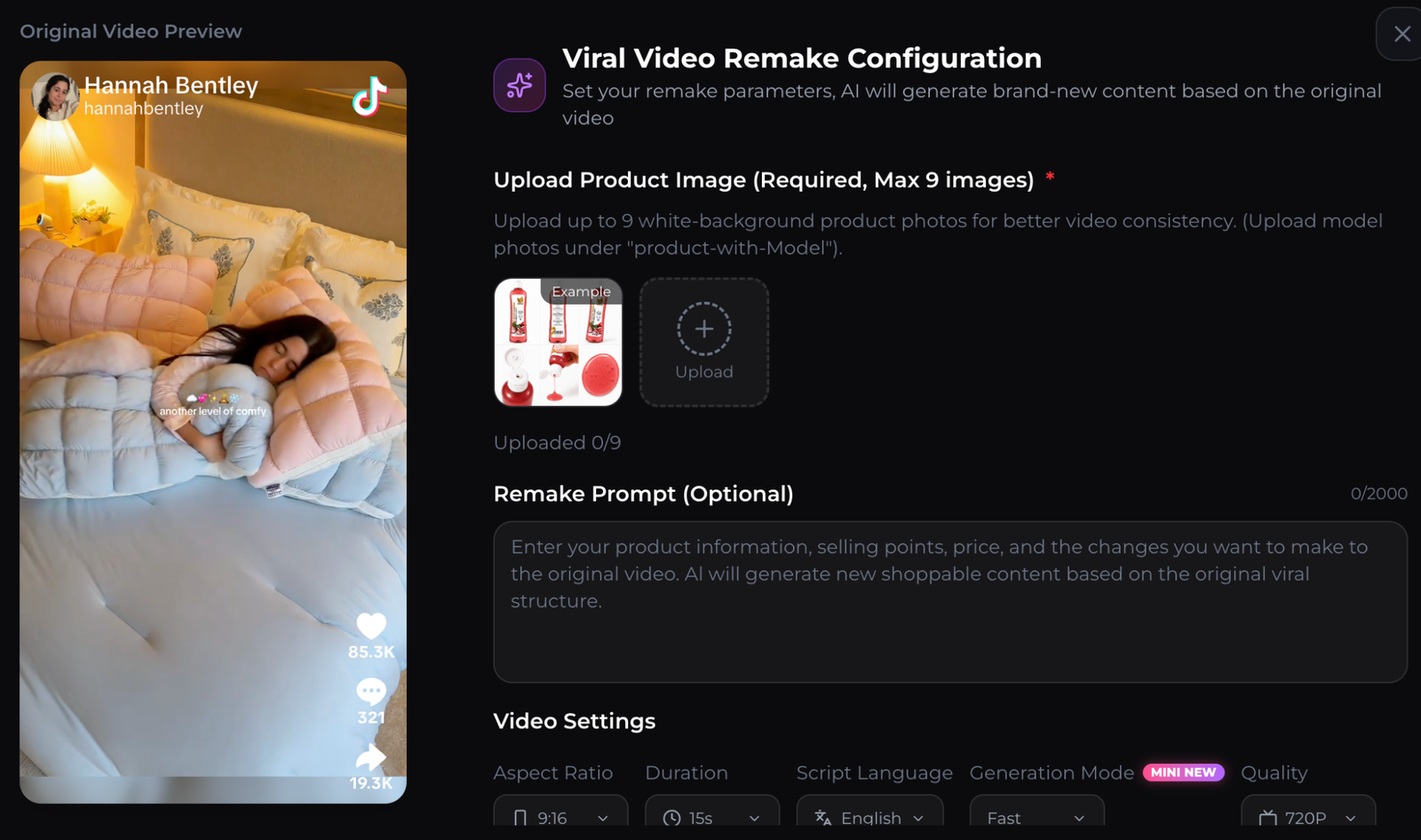
- Can you control aspect ratio, duration, language, and quality?
- Can you describe the hook, proof moment, and call to action?
- Can you preview the reference and the new configuration side by side?
- Can you export a file that meets the placement requirements you plan to use?
TikTok's official ad specifications recommend vertical 9:16 video and at least 720 by 1280 pixels for the relevant in-feed placement. Specifications can vary by ad product, so check the current TikTok video ad specifications before the final export.
How does a reference based workflow operate?
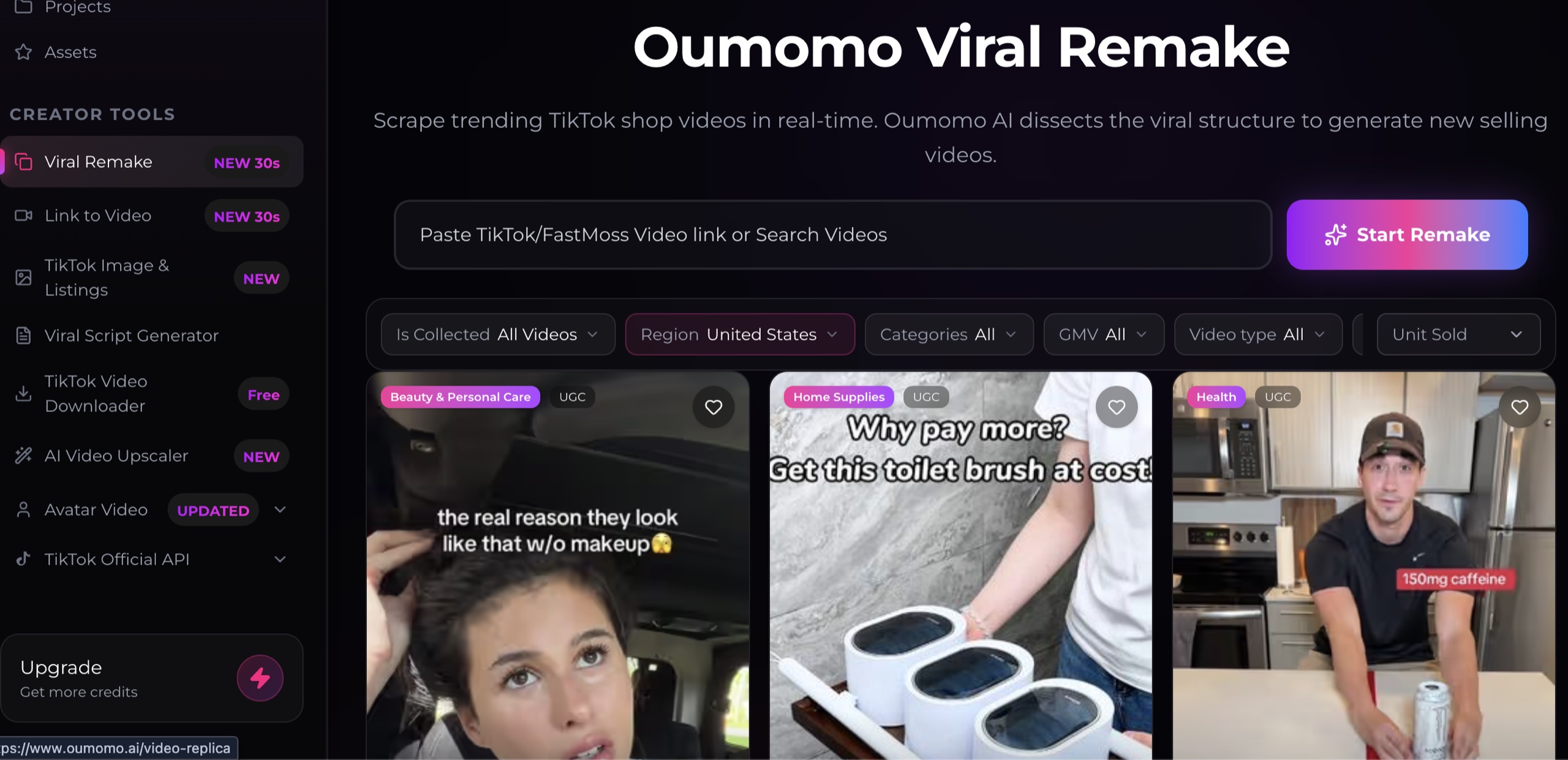
Oumomo's Viral Remake interface lets users browse or search reference videos, choose one, upload product images, add instructions, and select output settings. The visible interface accepts up to nine product images. That can be useful when packaging, texture, color, and multiple angles must remain recognizable.
Treat a reference as a structure to analyze, not content to copy. Write down the opening pattern, scene order, product reveal, proof moment, pacing, and close. Then rebuild those functions with original assets, original wording, and claims you can substantiate.
The distinction matters for both quality and rights. A high-performing public video is not automatically licensed for reuse. Keep a record of your source assets and avoid downloading or republishing another creator's footage, voice, likeness, music, or script without permission.
How should you prepare product inputs?
Clean inputs make review easier. Use the highest-resolution source images available, keep the exact packaging visible, and include several angles when shape matters. If a person appears with the product, make sure you have the right to use that person's image.
Prepare a compact creative brief before opening the AI product video generator:
- Audience and market
- One customer problem
- One verifiable product benefit
- Required packaging details
- Prohibited claims or visuals
- Desired opening hook
- Target duration and 9:16 layout
- One next action
Do not put every benefit into one short clip. A clearer testing plan creates separate versions for separate hypotheses. One video can test a problem-first opening, another can test a demonstration, and another can test a comparison that you can support.
What prompt structure produces a useful first draft?
A useful prompt describes the job of each scene instead of relying on adjectives such as viral, cinematic, or high converting. It also identifies what must not change.
Create a vertical product video for [audience].
Goal: test whether [specific hook] earns attention.
Scene 1: show [problem or curiosity moment].
Scene 2: reveal the exact product and packaging.
Scene 3: demonstrate [verifiable benefit].
Scene 4: close with [single action].
Keep unchanged: logo, product color, label text, and proportions.
Avoid: unsupported claims, competitor logos, extra products, and unreadable text.
ByteDance says Seedance 2.0 accepts text, image, audio, and video inputs and can generate multi-shot audiovisual content. Those capabilities make precise references possible, but the result still needs human review. More inputs are useful only when they make the direction clearer.
How do you review the generated video?
Watch the first draft at normal speed, muted, and frame by frame. Each pass reveals a different problem. Normal speed tests comprehension. Muted playback tests whether the visuals and captions stand alone. Frame review catches changing labels, warped products, unsafe demonstrations, and continuity errors.
Use this release checklist:
- The product name, color, size, and packaging stay accurate.
- Spoken and on-screen claims match approved evidence.
- Captions fit inside the platform-safe area and remain readable.
- Hands, faces, reflections, and contact with the product look plausible.
- Music, footage, likenesses, and logos are licensed or owned.
- The export meets the chosen TikTok placement specification.
- The destination link matches the exact offer shown in the video.
For the destination, use a focused product landing page, a mobile web card, or a link in bio page with one primary action. Generation creates the asset; the destination makes the campaign measurable.
How should you test several versions?
Change one meaningful variable at a time. If the hook, script, product angle, duration, and call to action all change together, you will not know what caused the performance difference.
Start with three versions:
- Same product and proof, different first two seconds
- Same hook, different demonstration order
- Same video, different destination headline
Track watch time, completion, clicks, qualified visits, and downstream action. Views alone do not tell you whether the video represented the product accurately or attracted the right customer.
FAQ about AI product video generators
Is an AI product video generator free?
Some services provide trial credits, but free access is usually limited by credits, export quality, watermarking, or model choice. Review the current plan and the cost of the settings you actually need.
Can I copy a viral TikTok with AI?
You can study a public video's structure, but that does not grant permission to copy its footage, script, voice, music, or likeness. Create an original execution with assets and claims you are allowed to use.
Is Oumomo the best choice for every seller?
No single tool is best for every workflow. Oumomo is relevant when reference discovery and product-oriented generation belong in the same process. Compare it with your needs for control, rights management, product consistency, review, and cost.
Does AI generated video guarantee TikTok performance?
No. Generation speed can increase the number of responsible tests you run, but distribution and sales depend on the audience, offer, creative, account history, product, and landing experience.
About this content
- Written by
- CueCue, Editorial Team
- Last updated
- August 6, 2026
- Editorial standard
- CueCue articles are written for practical use, checked for clear sourcing, and updated when product or policy details change.