Create Online Invitations With Built-In RSVP

Design online invitations that feel modern, share easily, and collect responses without a separate tool.

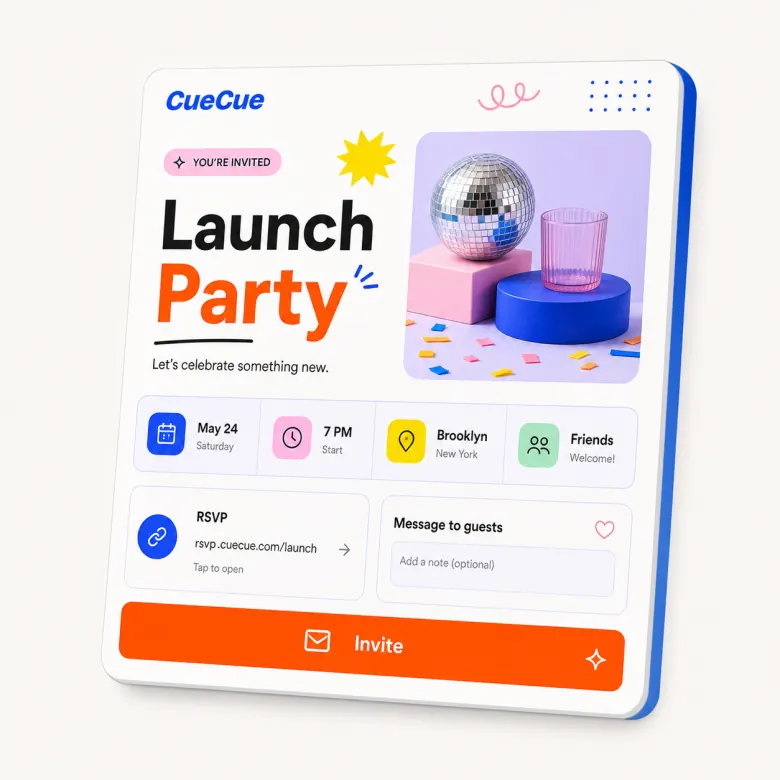
Online invitation card with built-in RSVP form

Problem

Why this page exists

Online invitations need to be attractive, but they also need to help guests act. A pretty image alone cannot collect RSVP responses, show updated details, link to maps, or answer guest questions. Hosts need an invitation that is both visual and functional.

CueCue approach

How CueCue solves it

CueCue treats the invitation as an interactive event card. It can include event photos, date and time, venue details, map links, host notes, RSVP forms, and post-event links, all behind one mobile-friendly URL.

What you can build

Online Invitation Maker With RSVP Links

Create online invitations with photos, event details, maps, and built-in RSVP links for parties, workshops, meetups, and launches.

01

Design without design skills

Start from a polished invitation card, then update the text, sections, colors, images, and response flow.

02

Everything guests need

Bring together the schedule, venue, map, host details, images, RSVP form, and follow-up links.

03

Made for modern sharing

Post invitations in group chats, email campaigns, community tools, social stories, and printed QR codes.

04

Templates for many event types

Create party invitations, workshop pages, product launch invites, meetups, dinners, and community events.

Workflow

Choose, Customize, Publish, and Improve

Each page should help visitors understand the path from search intent to a published card they can share.

01

Choose the invitation style and add event basics: name, host, date, time, location, and main visual.

02

Add practical modules such as schedule, map, dress code, guest notes, RSVP fields, and confirmation copy.

03

Share the invitation through email, text, social stories, community tools, QR codes, or printed materials.

04

Update the invitation if location, timing, capacity, or follow-up details change.

Templates

Start From Specific Card Examples

Template examples make the page useful for real visitors and help each search intent connect to a practical starting point.

Party invitation card with photo, host note, RSVP, plus-one, and map link.

Workshop invitation with speaker details, agenda, registration CTA, and attendee questions.

Product launch invitation with teaser image, date, RSVP, location, and follow-up link.

Community meetup invitation with venue, sponsor note, social links, and RSVP form.

Comparison

How to Think About This Card Type

CueCue pages should educate users without sounding like a generic SEO article. These comparisons clarify where the card format fits.

Compared with a static invitation image, a CueCue invitation can collect responses and update details.

Compared with a full event website, an invitation card keeps the guest path simpler.

Compared with separate invitation and form tools, CueCue keeps the story and response in one page.

Audience

Who This Workflow Helps

Each page stays specific to a visitor job to be done while still showing how CueCue works as a broader interactive card system.

Party hosts
Workshop organizers
Community teams
Product launch teams

Proof points

Why an Interactive Card Works

These product proof points support the conversion story without relying on keyword stuffing or thin repeated paragraphs.

Every page is published as a fast web destination that works from mobile profiles, QR codes, messages, newsletters, and email signatures.

The card can stay live while the content changes, so teams do not need to replace printed QR codes or profile links after every update.

Focused sections keep the visitor moving toward one primary next step instead of scattering attention across a full website.

Templates, modules, and related pages make it easier to start from a proven structure and then adapt the card to the campaign.

Modules

Build With Focused Card Blocks

Start with the modules that fit this workflow, then keep the card focused around one primary next step.

Invitation heroRSVP blockVenue detailsHost note

Related searches

Built Around Real Search Intent

This page maps mature search demand to CueCue's broader concept of interactive web cards.

  • online invitation maker
  • digital invitation maker
  • party invitation maker
  • event invitation maker

Related pages

Explore More CueCue Card Workflows

Move from one search intent into the broader interactive web card system.

FAQ

Online invitation maker FAQ

What is the best way to collect RSVP responses online?

Use a short mobile-friendly form connected to the invitation or event page. Keep the deadline clear and ask only for the details needed to plan.

Can I make a party invitation?

Yes. Party invitations are one of the core template categories planned for CueCue.

Can an online invitation include an RSVP form?

Yes. CueCue invitations can include RSVP fields so guests can respond from the same page.

Can I add photos and maps?

Yes. Online invitations can include images, location notes, map links, schedule details, host notes, and follow-up links.

How do I make an online party invitation with RSVP?

Create a mobile invitation with the party details, host note, photos, map link, RSVP deadline, and a short response form.

Is an online invitation better than sending an image invite?

An image invite is fine for simple announcements, but an online invitation is better when guests need updated details, maps, RSVP fields, or follow-up links.

Can I include a QR code with an online invitation?

Yes. Share the invitation as a URL, QR code, message, email, story, or printed insert so guests can open it from the channel they prefer.

What details should an online invitation include?

Include the event name, host, date, time, location, map or venue note, RSVP deadline, guest instructions, and the primary response action.

Can I update an online invitation after sending it?

Yes. Update the card if the venue, schedule, capacity, dress code, or follow-up details change while keeping the same shared link.

Do guests need an account to view an online invitation?

No. A CueCue invitation is designed as a web page guests can open from a shared link.