
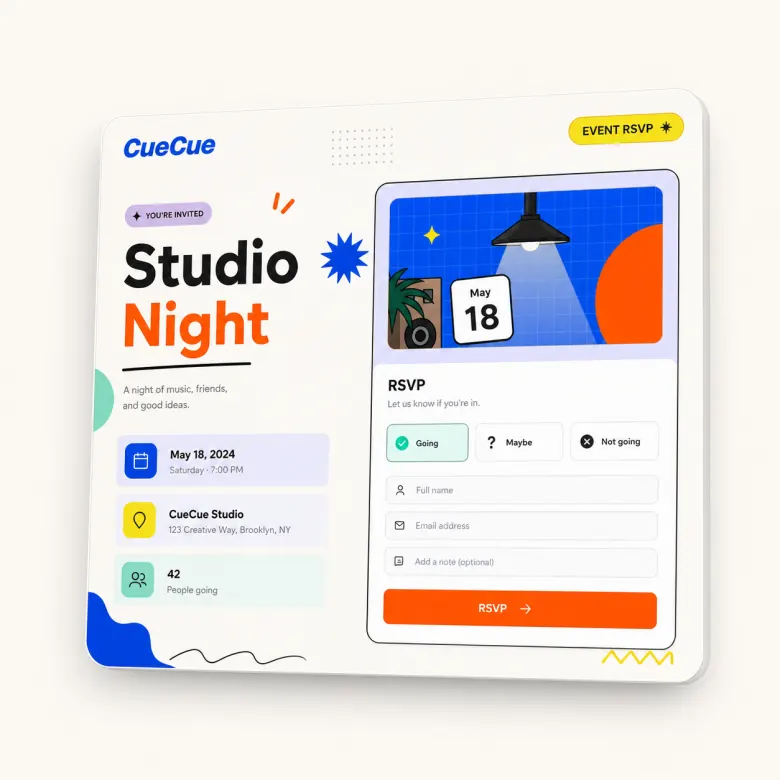
Create a shareable RSVP link that guests can open from a phone, message, email, social bio, or QR code. CueCue helps you build a mobile RSVP page with event details, guest questions, and a clear response action.
Use it for workshops, pop-ups, creator meetups, launch events, private parties, classes, and small community gatherings.
If you need a form-focused setup with more question control, see the RSVP form builder.
Create an RSVP Link Guests Can Open Anywhere
An RSVP link should be easy to share and easy to answer. Guests should not need to search through a long event description or open a complicated registration platform just to say whether they are coming.
With CueCue, you can build a focused RSVP page that explains the event and collects the response from one mobile-friendly link.
What Your RSVP Link Should Include
Event date, location, and host details
Make the essential details visible before the response action: event name, date, time, location, host, and who the event is for.
Guest count and response fields
Ask whether the guest is attending, how many people are coming, and whether they have notes or preferences. Keep the form short unless the event requires more detail.
Confirmation and follow-up message
Tell guests what happens after they submit. If they should expect a reminder, bring something, or wait for approval, say so clearly.
How to Make an RSVP Link in CueCue
Choose an RSVP template, add your event details, add the response questions, and publish the page. Then share the link from social media, group chat, email, or QR code.
If you need more form-specific structure, use the RSVP form builder.
RSVP Link Examples
Use an RSVP link for:
- A workshop with limited seats
- A creator meetup
- A private dinner or party
- A product launch event
- A local pop-up
- A class or training session
- A watch party or community event
CueCue vs Google Forms or Eventbrite
Google Forms is useful for collecting simple responses. Eventbrite is useful for heavier event registration and ticketing workflows. CueCue fits lightweight events where you want a branded mobile page, event details, and an RSVP action in one place.
For more complete event context, build an event page.
FAQ
What is an RSVP link?
An RSVP link is a shareable URL guests use to confirm whether they plan to attend an event. It can be sent through email, text, social media, group chat, or a QR code.
What should an RSVP link include?
It should include the event name, date, time, location, host, response options, guest count fields, and any essential notes such as dress code, capacity, or what to bring.
Can guests RSVP from mobile?
Yes. CueCue RSVP pages are designed for mobile sharing, which is important because many guests will open the link from a phone.
Can I use an RSVP link for free events?
Yes. RSVP links are especially useful for free or lightweight events where you need attendance information but do not need complex ticketing.
Can I share an RSVP link with a QR code?
Yes. You can place the RSVP link behind a QR code on posters, flyers, table signs, invitations, or event screens.
When should I use Eventbrite instead?
Use a dedicated event platform when you need advanced ticketing, payments, attendee tiers, complex check-in, or large-scale event operations. CueCue is better for lightweight RSVP pages and small event actions.