
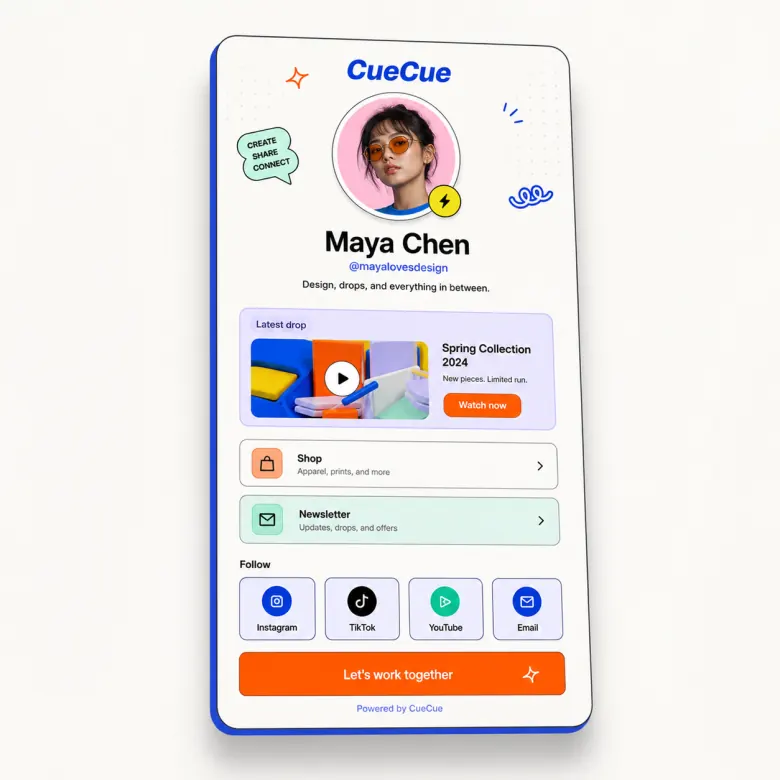
Create a mobile link in bio page that helps people do something after they tap. CueCue lets you bring links, forms, videos, offers, event actions, and booking CTAs into one focused page for Instagram, TikTok, YouTube, QR codes, and small campaigns.
Instead of sending visitors to a static list, build a page that explains what you offer and guides them toward the next step.
Turn Your Bio Link Into an Action Page
Your audience is already arriving with intent. They saw your post, scanned your QR code, watched your video, or heard about your event. A good link in bio page should make the next step obvious.
CueCue helps you turn that single profile link into a mobile action page for leads, RSVPs, bookings, product interest, content views, or service inquiries.
For a practical comparison, see Linktree alternatives.
Who This Link in Bio Page Is For
Creators selling offers or growing an audience
Use your bio page to share content, promote a product, collect brand inquiries, link to a newsletter, or guide visitors toward a paid offer.
Small businesses collecting bookings or inquiries
Use it for services, menus, appointment links, address details, inquiry forms, seasonal offers, and quote requests.
Event hosts sharing RSVP links
Use your bio link to promote a workshop, class, pop-up, meetup, or launch event. Link directly to a dedicated event page when the event needs more context.
Link in Bio Features That Drive Action
A strong link in bio page usually includes:
- A short intro that tells visitors who you are
- A primary CTA for the most important action
- Secondary links for content, offers, products, or social profiles
- A form or contact path for leads
- Event or RSVP links when relevant
- Visual content such as videos, images, or examples
- A simple mobile layout that does not overwhelm visitors
How to Set Up Your Link in Bio Page
Decide the main action
First, decide the main action. Do you want visitors to book, buy, join, RSVP, follow, submit a request, or watch something? Then build the page around that action.
Add context and the primary CTA
Next, add the minimum amount of information needed to make the action feel clear. A bio page should be short, but not empty. Give visitors enough context to trust the click.
Publish and share the page
Finally, publish the page and use it wherever your audience already finds you: Instagram bio, TikTok bio, YouTube description, email signature, QR code, or campaign page.
CueCue vs Basic Link in Bio Tools
Basic bio link tools are useful when your only goal is to list links. CueCue is better when you need a small page that explains the action around those links.
Use CueCue when you want your bio page to include a lead form, RSVP action, offer page, product link, video section, or business inquiry flow. Use a simple link list when you only need a directory of URLs.
FAQ
What is a link in bio page?
A link in bio page is a single page linked from a social profile, usually Instagram, TikTok, YouTube, or another platform where profile links are limited. It helps visitors find your most important destinations. With CueCue, that page can also include action-focused sections such as forms, RSVPs, videos, offers, and CTAs.
How is CueCue different from a basic link list?
A basic link list mainly organizes URLs. CueCue helps you build a mobile page around visitor action. That means you can add context before the link, collect information, promote a specific offer, or direct visitors to an RSVP or inquiry flow.
Can creators use this for products and bookings?
Yes, creators can use a bio page to promote products, services, bookings, or content. CueCue does not need to replace your payment, store, or booking tool. It can act as the mobile page that explains the offer and sends visitors to the right next step.
Can small businesses collect inquiries from a bio link?
Yes. A small business can use a link in bio page to collect service inquiries, quote requests, booking interest, or event responses. For more structured intake, link visitors to a client intake form.
Can I add an RSVP link for an event?
Yes. A link in bio page is a natural place to promote RSVP actions for workshops, community events, launches, private sessions, or pop-ups. If the event needs its own page, use a dedicated RSVP link maker.
Can I use this page with QR codes?
Yes. You can share the page URL through a QR code on flyers, table cards, posters, packaging, business cards, or event signage. Keep the page mobile-friendly because most QR traffic will come from phones.