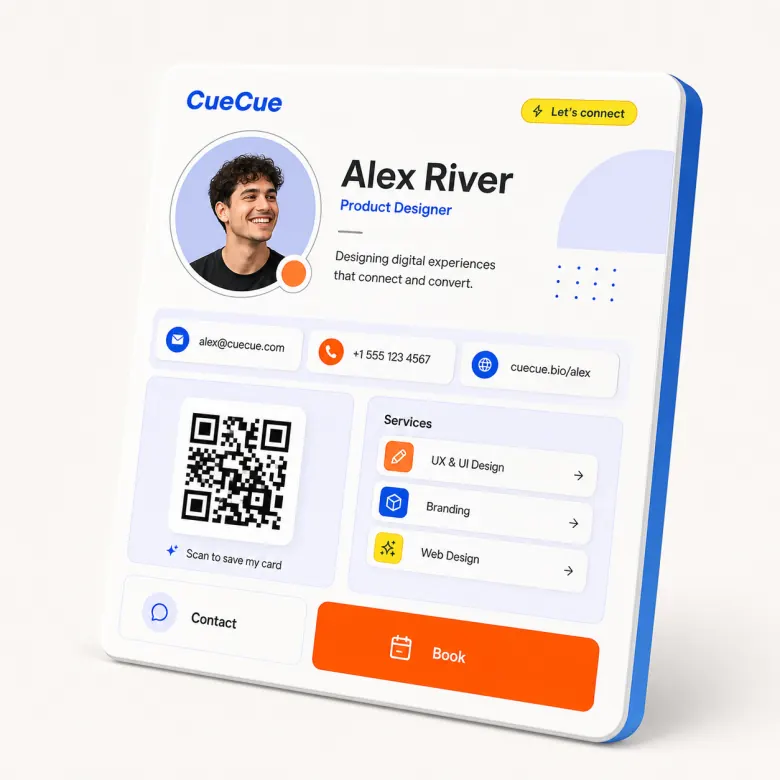
Create Interactive Digital Cards for Any Shareable Moment

CueCue is a card creator for modern web cards: business cards, bio links, RSVP cards, offer cards, product cards, and social cards.

Web card creator example for business, bio links, events, and offers

Problem

Why this page exists

People search for a card creator with very different goals: some need a business card, others need an RSVP card, product card, offer card, or social card. A generic editor often gives them a blank canvas, while a narrow tool only supports one card type. That creates friction when the real need is a focused web page that behaves like a card.

CueCue approach

How CueCue solves it

CueCue treats each card as a publishable web destination. The creator starts from a card type, adds the right modules, and keeps the page focused on the visitor action. It intentionally avoids unrelated entertainment searches such as Pokemon or MTG card creators in the core SEO architecture.

What you can build

Card Creator for Interactive Digital Cards

Create interactive digital cards for business, bio links, RSVP pages, offers, products, social profiles, and events with one shareable web card.

01

Choose a card type

Start with a business card, creator bio, RSVP card, product card, service offer, or event invitation.

02

Add modular blocks

Use blocks for links, products, event details, booking, maps, videos, testimonials, forms, and lead capture.

03

Publish one fast page

Create a shareable web card that works on mobile, desktop, QR codes, social profiles, and email signatures.

04

Improve over time

Use the same card as a living destination for each campaign, offer, launch, or event.

Workflow

Choose, Customize, Publish, and Improve

Each page should help visitors understand the path from search intent to a published card they can share.

01

Pick the intent: connect, book, RSVP, promote, sell, subscribe, or share a profile.

02

Start from a card structure instead of a blank page so the hierarchy is already clear.

03

Add business, bio, event, product, offer, contact, or social modules based on the card type.

04

Publish and keep improving the card as the campaign, event, or personal profile changes.

Templates

Start From Specific Card Examples

Template examples make the page useful for real visitors and help each search intent connect to a practical starting point.

Business card creator template with contact details, services, booking, and QR sharing.

Social card template with creator bio, featured links, media, and newsletter capture.

Event card template with host details, agenda, location, and RSVP modules.

Product card template with image, offer details, proof, and a purchase or waitlist CTA.

Comparison

How to Think About This Card Type

CueCue pages should educate users without sounding like a generic SEO article. These comparisons clarify where the card format fits.

Unlike a graphic card maker, CueCue publishes interactive cards as web pages rather than static images.

Unlike a website builder, CueCue keeps the creation flow centered on compact card modules.

Unlike game card creators, CueCue focuses on business, creator, event, product, and offer workflows.

Audience

Who This Workflow Helps

Each page stays specific to a visitor job to be done while still showing how CueCue works as a broader interactive card system.

Professionals
Creators
Event hosts
Small teams

Proof points

Why an Interactive Card Works

These product proof points support the conversion story without relying on keyword stuffing or thin repeated paragraphs.

Every page is published as a fast web destination that works from mobile profiles, QR codes, messages, newsletters, and email signatures.

The card can stay live while the content changes, so teams do not need to replace printed QR codes or profile links after every update.

Focused sections keep the visitor moving toward one primary next step instead of scattering attention across a full website.

Templates, modules, and related pages make it easier to start from a proven structure and then adapt the card to the campaign.

Modules

Build With Focused Card Blocks

Start with the modules that fit this workflow, then keep the card focused around one primary next step.

Profile headerAction buttonsMedia blockContact form

Related searches

Built Around Real Search Intent

This page maps mature search demand to CueCue's broader concept of interactive web cards.

  • card creator
  • digital card creator
  • web card creator
  • interactive card creator

Related pages

Explore More CueCue Card Workflows

Move from one search intent into the broader interactive web card system.

FAQ

Card creator FAQ

What can I make with a digital card creator?

You can create business cards, bio links, RSVP cards, invitations, offer cards, product cards, and social profile cards.

Can I create different card types from one system?

Yes. CueCue uses one modular card system that can adapt to many sharing and conversion workflows.

What is the best card creator for a shareable online card?

Choose a creator that publishes a real web page, supports mobile sharing, and includes the modules you need for links, contact, RSVP, products, or offers.

Can a card creator publish a real web page?

Yes. CueCue cards are designed to be published as shareable web pages that work from links and QR codes.

Can I start from a template?

Yes. Templates help you choose a card type first, then customize the modules, text, visuals, and calls to action.

Is this card creator for business cards or social cards?

CueCue is built for both. You can make business cards, social bio cards, RSVP cards, event cards, product cards, and offer cards from the same modular system.

Can I make a card without starting from a blank canvas?

Yes. Start with the card type and template closest to your goal, then edit the sections, links, visuals, and calls to action.

What is the difference between a digital card creator and a graphic card maker?

A graphic card maker usually creates a static image or printable design. CueCue creates interactive web cards that can include live links, forms, contact actions, and updates.

Can I use one card creator for different campaigns?

Yes. Reuse the same structure for new launches, offers, events, profiles, or QR campaigns, then update the content for each moment.

What makes a card easier for visitors to act on?

A clear headline, one primary CTA, short supporting sections, and links that match the visitor's intent make a card easier to understand and use.