Create a Web Card That Turns Every Link Into an Action

CueCue helps you build compact web cards that feel easier than a full website and richer than a plain link list.

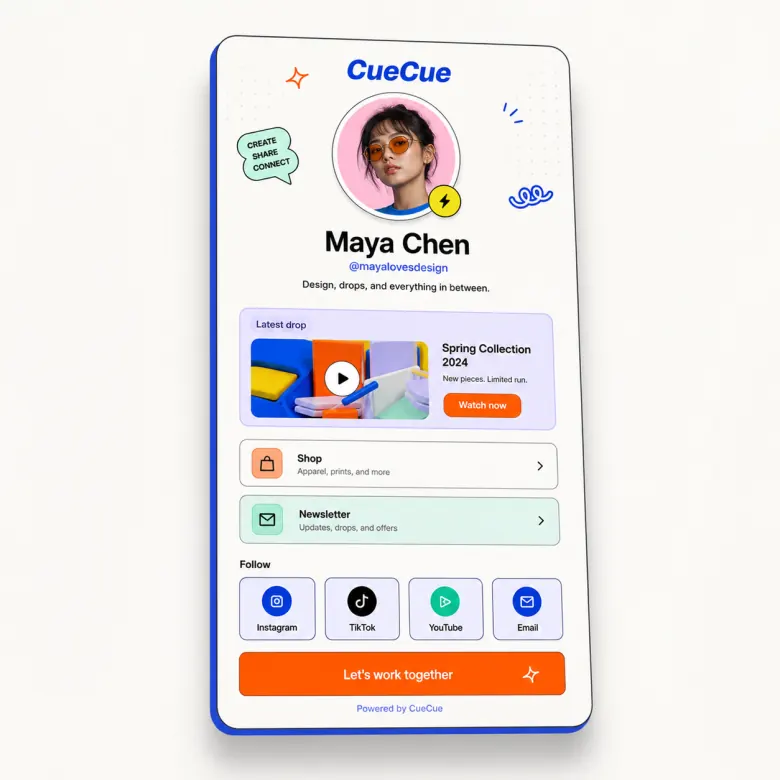
Interactive web card with profile, links, products, and calls to action

Problem

Why this page exists

Most people do not need a full website for every offer, event, profile, or product moment. They need a small destination that loads quickly, explains the next step, and is easy to share from a phone. A web card fits that gap because it gives a campaign or profile enough structure without asking visitors to navigate a large site.

CueCue approach

How CueCue solves it

CueCue positions the web card as the flexible layer between a link list and a full website. Use it to introduce the person, offer, event, product, or service, then guide visitors toward one action such as booking, subscribing, buying, saving contact details, or sending an RSVP.

What you can build

Web Card Creator for Interactive Mobile Pages

Create a web card for profiles, links, offers, products, events, and campaigns. Share one focused mobile-first page anywhere.

01

One card for one moment

Use a focused card for a profile, launch, RSVP, offer, product drop, waitlist, or service introduction.

02

Built for mobile sharing

CueCue cards are designed for QR codes, social profiles, messages, email signatures, and short campaign links.

03

Richer than a link list

Add visual sections, featured actions, products, booking links, event details, forms, and social proof.

04

Easy to update after sharing

Keep the same URL while changing the content, offer, or next action behind the card.

Workflow

Choose, Customize, Publish, and Improve

Each page should help visitors understand the path from search intent to a published card they can share.

01

Choose the card type that matches the moment: profile, product, offer, event, service, RSVP, or bio link.

02

Add only the modules visitors need to decide: headline, visual, proof, details, links, form, or contact options.

03

Publish one mobile-first URL that can be used from QR codes, social profiles, messages, communities, and campaigns.

04

Update the card as the offer changes while keeping the same shared URL active for existing visitors.

Templates

Start From Specific Card Examples

Template examples make the page useful for real visitors and help each search intent connect to a practical starting point.

Creator profile web card with featured content, newsletter signup, social links, and current offer.

Local service web card with contact options, booking CTA, service list, proof, and map link.

Product drop web card with hero image, benefits, launch details, and buy or waitlist CTA.

Event web card with date, location, host note, RSVP link, and follow-up resources.

Comparison

How to Think About This Card Type

CueCue pages should educate users without sounding like a generic SEO article. These comparisons clarify where the card format fits.

Compared with a full website, a web card is faster to launch and more focused on one action.

Compared with a link in bio list, a web card gives priority to the most important content instead of making every link look equal.

Compared with a static image or PDF, a web card can be updated after sharing and can include real interactive modules.

Audience

Who This Workflow Helps

Each page stays specific to a visitor job to be done while still showing how CueCue works as a broader interactive card system.

Creators
Local service businesses
Event hosts
Product and offer teams

Proof points

Why an Interactive Card Works

These product proof points support the conversion story without relying on keyword stuffing or thin repeated paragraphs.

Every page is published as a fast web destination that works from mobile profiles, QR codes, messages, newsletters, and email signatures.

The card can stay live while the content changes, so teams do not need to replace printed QR codes or profile links after every update.

Focused sections keep the visitor moving toward one primary next step instead of scattering attention across a full website.

Templates, modules, and related pages make it easier to start from a proven structure and then adapt the card to the campaign.

Modules

Build With Focused Card Blocks

Start with the modules that fit this workflow, then keep the card focused around one primary next step.

Featured CTASocial linksProduct cardLead capture

Related searches

Built Around Real Search Intent

This page maps mature search demand to CueCue's broader concept of interactive web cards.

  • web card
  • website card
  • interactive card
  • digital card

Related pages

Explore More CueCue Card Workflows

Move from one search intent into the broader interactive web card system.

FAQ

Web card creator FAQ

What is a web card?

A web card is a compact, shareable web page built around one profile, offer, event, product, or call to action.

Is a web card different from a website?

Yes. A web card is simpler and more focused than a full website, making it easier to share from mobile and social channels.

When should I use a web card instead of a full website?

Use a web card when the goal is specific: introduce a profile, promote an offer, collect RSVP responses, launch a product, or send visitors to one next step.

Can a web card work with QR codes?

Yes. A CueCue web card can be shared through QR codes on print materials, packaging, event signage, business cards, or local promotions.

Can I use one web card for multiple channels?

Yes. The same card can work from social profiles, email signatures, newsletters, text messages, communities, and paid campaigns.

Why use a web card instead of a plain list of links?

Use a web card when visitors need context before they choose a link. A card can lead with the main offer, event, product, or profile story instead of making every link look equally important.

Can a web card replace a quick campaign landing page?

Yes, when the campaign has one focused action. A web card is useful for launches, pop-ups, QR flyers, creator offers, and short-term promotions that do not need a full site.

What should I put at the top of a web card?

Start with the visitor's reason for opening the card: the offer, event, profile, product, or next step. Put supporting links and details below that first action.

Can I change a web card after printing a QR code?

Yes. The card content can be updated while the shared URL stays the same, which is useful for printed QR codes, packaging, signage, and business cards.

Is a web card good for people who do not want to scan anything complicated?

A web card should stay simple: one QR code or link, fast mobile loading, and a clear first action. That makes it easier for visitors who do not want to navigate a full website.